


The best CRMs for startups
11 CRMs compared on upkeep, outreach, setup time and full stack cost
The best CRM for a startup is the one your team keeps up to date without thinking about it, and that grows with you from founder-led sales to a full go-to-market team. Zero is the AI-native option: agents keep every record up to date, and sourcing, outreach and pipeline run in one product. HubSpot is the best free starting point, Attio suits RevOps-led teams that want a customisable database, and Pipedrive is the simplest pipeline to learn.
Taru Heikinniemi, Head of Growth· · 28 min read

We compared 11 CRMs on what matters to startups from pre-seed to Series B: keeping the data current, finding and reaching new customers, setup time, and what the full stack costs once you grow.
Our top three picks
| Tool | Best for |
|---|---|
| Zero | Startups from pre-seed to Series A that want an AI-native CRM that keeps itself up to date, with sourcing and outreach built in |
| HubSpot | Startups that want a free start and a broad marketing, sales and service platform |
| Attio | RevOps-led teams that want a customisable database |
Why trust us
We build Zero, and we've spent years running sales on the other CRMs on this list. Each tool gets a clear best-for verdict, current pricing and honest cons, including ours.
Before Zero, our founders scaled Smartly.io to $100M ARR, our Head of Growth spent years as a CRM consultant and in-house HubSpot evangelist, and our Solutions Engineer worked at Salesforce. We've seen what happens to most CRMs at a startup: they start clean, then turn into the tool nobody wants to update.
Startups that run on Zero today:
- Pantera moved its sales stack to Zero at a quarter of what its legacy CRM tiers cost, had the whole team using it in two weeks, and got eight hours a week back from contact management.
- Emfas runs more than 60 customer relationships without a CRM admin.
- Context.dev, a Y Combinator company, moved from Attio in under a day and runs its product-led funnel on Zero.
"It used to take us 60 days to close a deal, but now we're closing in 30 days, even on enterprise clients. We've even had clients close within a week, which is insane. And that is because we have all the info through Zero." Sebastian Ferraz, Chief Revenue Officer at Watchdog
What a startup needs from a CRM
At first, your CRM can be just a spreadsheet. If it's you and your co-founder, that'll do just fine. When the first GTM hire joins, it's usually time to start building a system that scales and supports the work you do.
Most startups don't fail at choosing a CRM. They fail at building the complex GTM stack around it and keeping the stack and data current. Suddenly, half of your workday goes to integrations, wondering why the deal stages don't match, and nobody actually has data on why the deals didn't close. We judged each tool on five things that matter at this stage:
- Keeping the record current: how much of the CRM updates itself from emails, calls, meetings and signals, and how much depends on someone typing.
- Finding and reaching customers: whether sourcing, enrichment and outreach are built in, or come from separate tools with their own copy of the data.
- Setup time: how quickly a small team is up and running without an admin or consultant.
- Full stack cost: the seat price plus the tools and add-ons you'd need around it, at the plan you'll be on in six months.
- Room to grow: whether the same system works for a founder selling alone and for a 30-person go-to-market team.
The 11 best CRMs for startups at a glance
| # | Tool | Best for | Keeps itself up to date | Sourcing and outreach | Free plan | Pricing |
|---|---|---|---|---|---|---|
| 1 | Zero | Startups from pre-seed to Series A that want an AI-native CRM with sourcing and outreach built in | Yes, agents update records from emails, calls and meetings | Built in: database, enrichment, email and LinkedIn sequences, dialer | No, 14-day trial | $77/seat/mo annual |
| 2 | HubSpot | A free start and a broad marketing platform | Partly, with Breeze AI on paid tiers | Sequences on paid Sales Hub tiers | Yes, 2 seats | Starter $20/seat/mo; Professional $90 and Enterprise $150/seat/mo annual, plus onboarding fees |
| 3 | Attio | RevOps-led teams that want a customisable database | Partly, contact and email sync | Email sequences on Pro; sourcing from other tools | Yes, 3 seats | Plus $35, Pro $79/seat/mo annual, plus credits |
| 4 | Pipedrive | The simplest visual pipeline | No, mostly manual | Prospector add-on or other tools | No | $14 to $79/seat/mo annual |
| 5 | Salesforce | Startups heading into complex enterprise sales | Partly, with Agentforce on higher tiers | Through add-ons and partners | No | Starter Suite $25/user/mo; Sales Cloud up to $550 |
| 6 | Lightfield | Meeting-heavy teams | Yes, from meetings, mail and calendar | Sequences in beta | No, 14-day trial on Starter | Starter $89/seat/mo (up to 3 seats); Pro $999/mo, Growth $2,999/mo per workspace |
| 7 | Monaco | Founders who've never run sales and need first meetings booked | Partly, a CRM layer under the outbound engine | Built in: database, account scoring, AI outbound, plus a sales exec from Monaco | No | Not published; reported around $25,000/yr |
| 8 | Close | Outbound teams that live on calls, email and SMS | Partly, communication logged automatically | Built-in calling, email and SMS sequences | No | $9 to $139/user/mo annual, plus usage |
| 9 | Zoho CRM | The most features for the price | No, mostly manual | Through Zoho apps and add-ons | Yes, 3 users | $14 to $52/user/mo annual |
| 10 | Freshsales | Small sales teams on a tight budget | Partly, with Freddy AI | Sequences on every paid tier, built-in phone and chat | No, 21-day trial | $9 to $59/user/mo annual |
| 11 | Folk | Relationship-driven teams like agencies and investors | Partly, contact sync from email and LinkedIn | Email campaigns; sequences on Premium | No | $24 to $80/seat/mo annual |
What's built in, and what you'll add
A CRM is rarely the only tool in a startup's go-to-market stack. A typical setup adds a lead database like Apollo or ZoomInfo, enrichment like Clay, a LinkedIn sequencer like HeyReach, a dialer like Aircall, a meeting notetaker, and Zapier to move data between them. Each one has its own bill, its own login and its own copy of the customer data, and someone has to keep them in sync.
Here's what each CRM covers on its own. Built in means included on the plan, paid tier means only on higher plans, add-on means paid extra, and separate tool means not offered.
| Tool | Lead database | Enrichment | Email sequences | LinkedIn outreach | Dialer | Meeting notes | Automation without automation tool |
|---|---|---|---|---|---|---|---|
| Zero | Built in | Built in | Built in | Built in | Built in | Via notetaker integrations | Built in, with agents |
| HubSpot | Add-on | Paid tier | Paid tier | Via Sales Navigator | Paid tier | Paid tier | Paid tier |
| Attio | Separate tool | Basic | Paid tier | Separate tool | Separate tool | Paid tier | Built in, on credits |
| Pipedrive | Add-on | Add-on | Add-on | Separate tool | Add-on | Separate tool | Paid tier |
| Salesforce | Add-on | Add-on | Paid tier | Via Sales Navigator | Add-on | Paid tier | Paid tier |
| Lightfield | Newer | Built in | Beta | Separate tool | Separate tool | Built in | Built in, with agents |
| Monaco | Built in | Built in | Built in | Unknown | Unknown | Built in | Built in, with agents and a Monaco sales exec |
| Close | Separate tool | Add-on | Built in | Separate tool | Built in | Paid tier | Paid tier |
| Zoho CRM | Add-on | Add-on | Paid tier | Separate tool | Add-on | Separate tool | Built in |
| Freshsales | Separate tool | Paid tier | Built in | Separate tool | Built in | Separate tool | Built in |
| Folk | Separate tool | Built in, on credits | Paid tier | Contact capture only | Separate tool | Separate tool | Paid tier |
When you compare prices, compare the full stack. A cheaper CRM plus four tools around it often costs more than an all-in-one plan, and the data stays split across systems. Pantera consolidated its sales stack into Zero and pays a quarter of what its earlier CRM tiers cost.
The tools, one by one
1. Zero
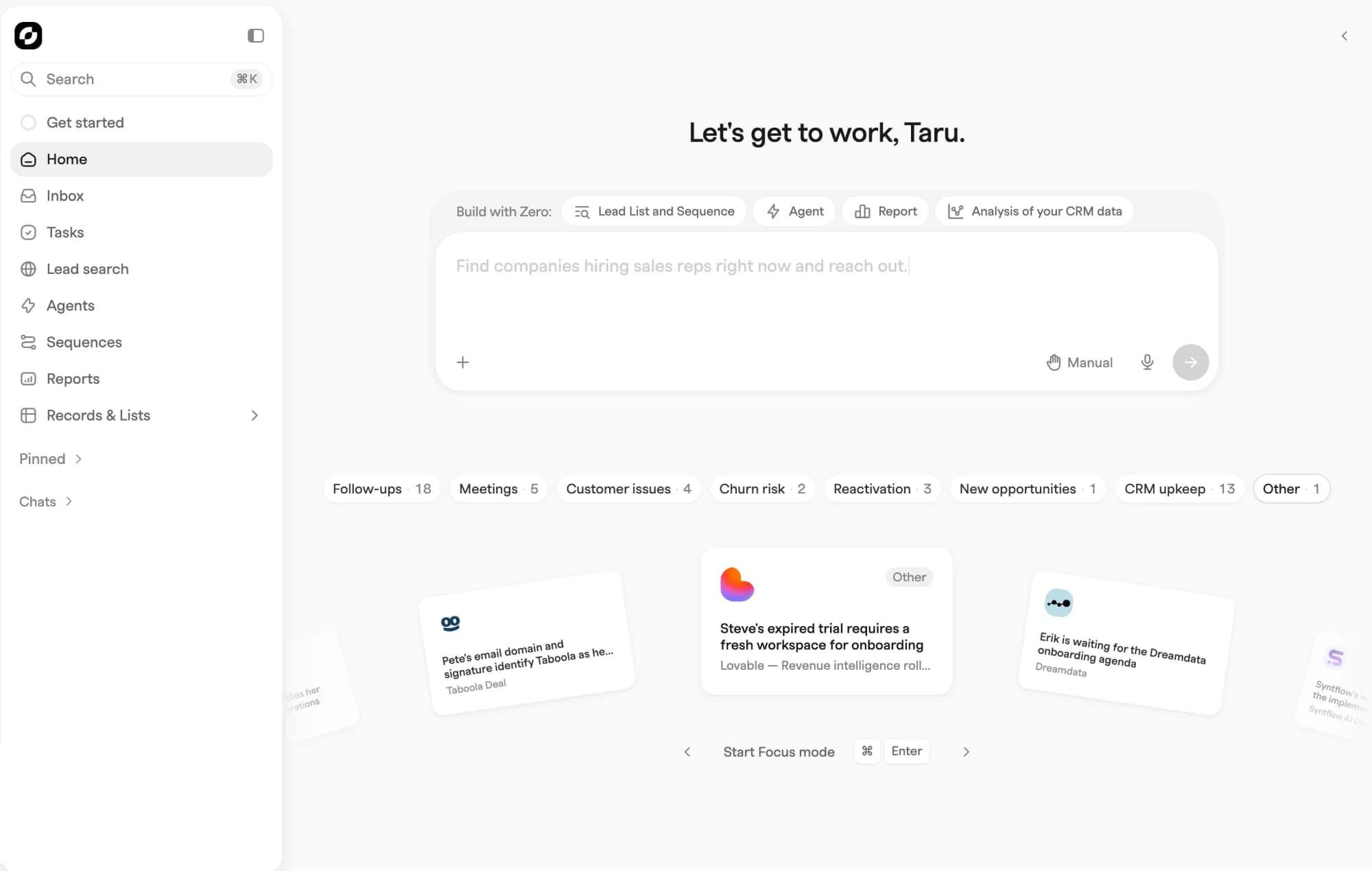
Best for: startups from pre-seed to Series A that want an AI-native CRM that keeps itself up to date, with sourcing, outreach and pipeline in one product.
Zero is the AI-native option on this list. There's a full CRM underneath, with contacts, companies, deals and a database of more than 20 million companies, and agents do the record-keeping on top of it. Calls, emails and meetings land on the record on their own, enrichment runs on its own, and deals move as customers act. It's built for founder-led sales teams, AI-native founders who don't want a traditional GTM stack, and Series A teams running bigger deals. See pricing and Zero vs HubSpot.
Key features
- Self-updating record: agents log activity and keep contacts, companies and deals current from email, calendar, calls and meeting notetakers.
- Sourcing and enrichment: a database of more than 20 million companies, with intent signals like job changes, funding and hiring.
- Outreach: multi-channel sequences across email and LinkedIn, plus a built-in dialer.
- Agents: build agents for your own workflows.
- Integrations: Google Workspace, Outlook, LinkedIn, Slack, Luma, notetakers (Fireflies, Circleback, Fathom, Granola, Notion, Wispr Flow, Garba and Jamie), Stripe, PostHog, support ticketing software like Plain, Intercom, Pylon and Front, plus an API and MCP server.
Pricing: one plan for the whole workflow. Pro is $77 per seat per month on annual billing, or $96 monthly, with 500 credits per seat a month and a 14-day free trial. Scale is custom-priced from ten seats. Sourcing, enrichment, outreach and agents are included.
Pros
- Nobody has to update the CRM by hand, so the pipeline stays current.
- Sourcing, enrichment and sequences in the same product, so you can drop several tools.
- One predictable price, with the full workflow included.
- Moving from HubSpot, Pipedrive or Attio takes about an hour.
"I don't remember since the migration was so fast. I think I clicked like 3 buttons." Yahia Bakour, Founder at Context.dev
Cons
- No free plan, and a higher seat price than entry-level CRMs. Compare the full stack cost.
- Younger than the other tools here, with a smaller marketplace and partner network.
- No custom objects. Zero uses custom activities instead, which cover most of what startups would build custom objects for.
What users say: users praise how quickly Zero is set up, a truly agentic, AI-first product, and needing fewer GTM tools because sourcing, enrichment and outreach are built in.
Verdict:Zero is the right choice if you want one AI-native system that finds, reaches and closes customers, and keeps itself up to date while you do the sales. It best fits startups from pre-seed to Series A, that don’t want to hire RevOps to keep a CRM alive. If you need a free plan, a large partner network or a heavily customised data model, look at HubSpot or Attio first.
2. HubSpot
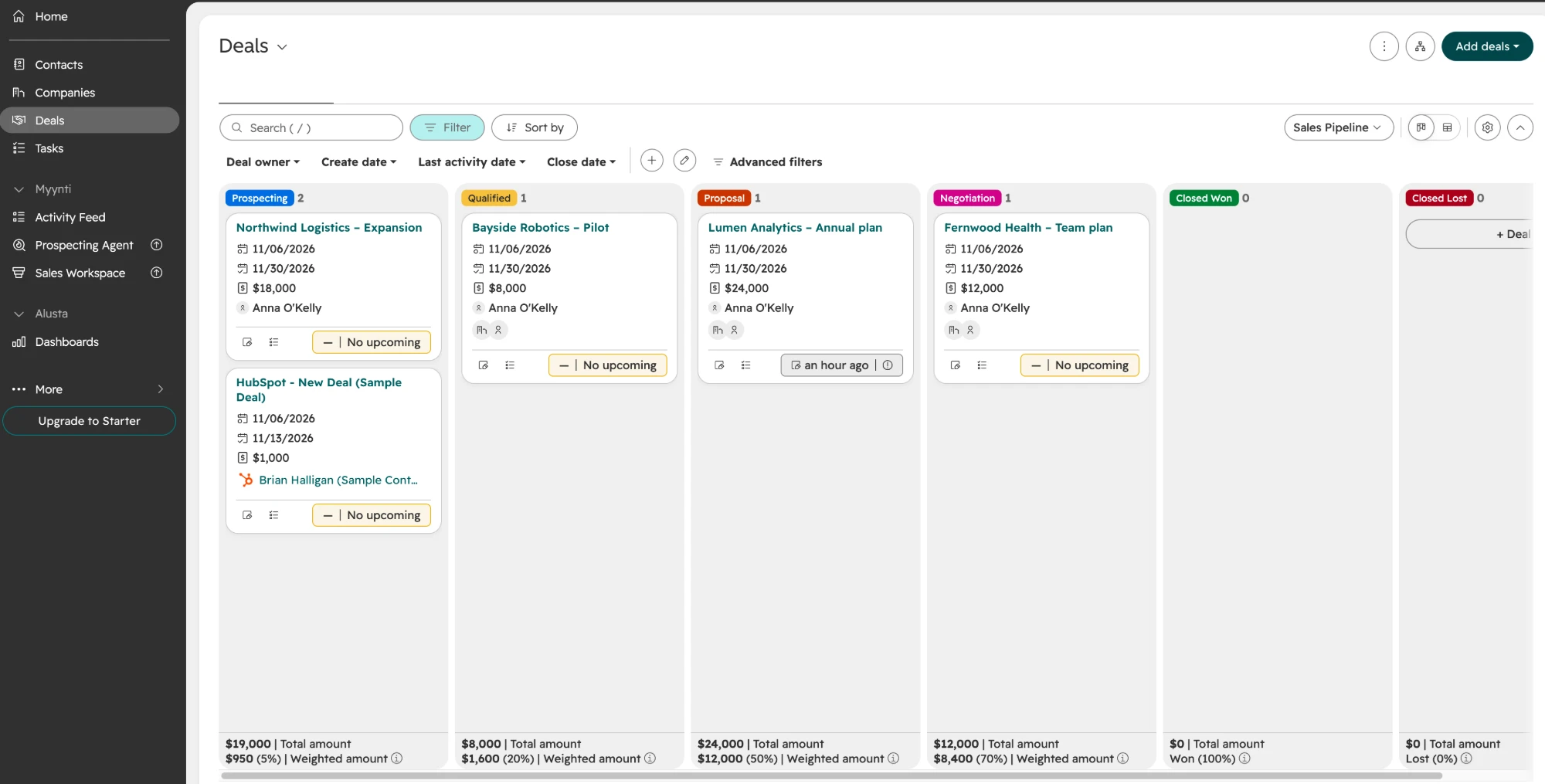
Best for: startups that want a free start and a broad platform for marketing, sales and service.
HubSpot is the default many startups start with. The free CRM covers contacts, deals, forms and basic reporting. Its marketing tools are the strongest on this list, but marketing automation sits on paid Marketing Hub plans. Funded startups can get large first-year discounts through the HubSpot for Startups program. As you grow, features sit behind higher tiers, and costs climb with seats and hubs. See Zero vs HubSpot and HubSpot pricing explained.
Key features
- Free CRM: contacts, deals, forms, live chat and dashboards.
- Marketing Hub: newsletters, landing pages, forms and marketing automation.
- Sales Hub: sequences, meeting scheduling and calling on paid tiers.
- Breeze AI: writing help and record summaries.
- App marketplace: integrations with most SaaS tools.
Pricing: free for up to two seats. Sales Hub Starter is $20 per seat per month. Professional is $90 per seat per month on annual billing ($100 monthly) plus a one-time $1,500 onboarding fee, and Enterprise is $150 per seat per month plus onboarding. Most sales teams end up on Professional: full sequences, workflow automation and custom reporting sit there, and Starter only covers the basics. Funded startups can apply for the HubSpot for Startups discount. Checked October 2026.
Pros
- A generous free plan and a startup discount.
- Marketing automation that many marketers already know.
- A huge ecosystem, plus HubSpot Academy for training.
Cons
- Not built AI-native: it works as a database your team keeps updated by hand, with AI added on top.
- Costs climb steeply as you add seats, hubs and tiers.
- Setting it up so it actually works for your team often takes an outside consultant or a former HubSpot admin, and keeping it that way usually needs a RevOps person.
What users say: users on G2 praise its ease of use and automation, but say costs climb fast on the higher tiers.
Verdict:HubSpot is the better choice if marketing drives most of your growth, you want a free start, and you’re ready to grow into the paid tiers. For a sales-led startup, budget for Professional and for someone to set it up and keep it running, then compare that with a tool that keeps itself up to date.
3. Attio
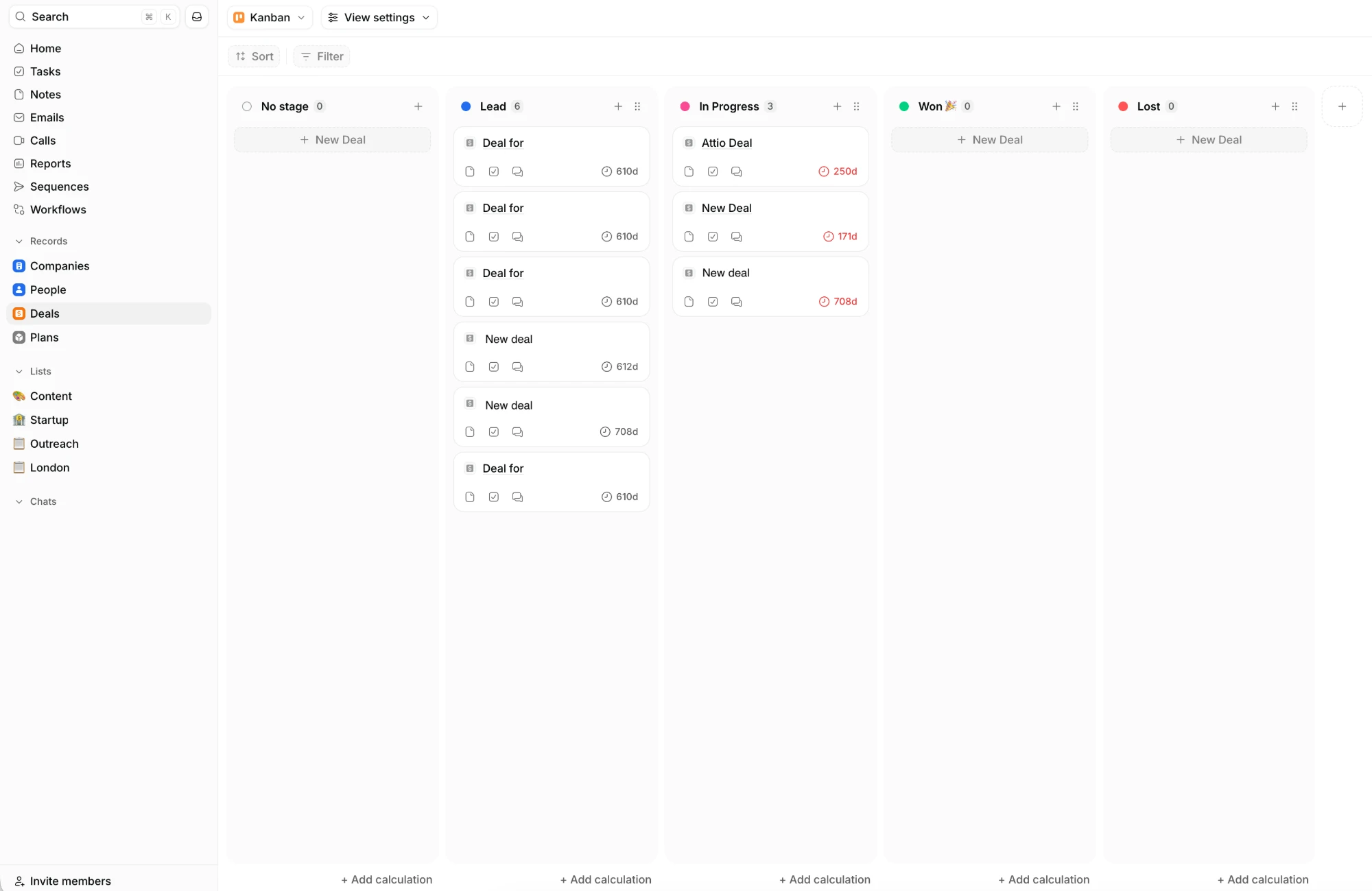
Best for: RevOps-led teams that want a customisable database, and have someone to design it.
Attio is a flexible system of record: objects, attributes, views and an API that you, or your RevOps person, shape into what you need. It started as Fundstack, a CRM for venture capital firms, in 2017, was rebuilt as a general CRM and launched publicly in 2023. It's a mature product with a large ecosystem, and it now describes itself as AI-native, with AI added to the database afterwards. Attio is at its best when someone on the team, usually a RevOps or GTM engineering person, designs the data model around how the company actually sells. For startups with unusual sales motions, that flexibility is a real advantage. For teams without that person, it can mean a blank canvas nobody has time to fill. See Zero vs Attio.
Key features
- Custom data model: custom objects, attributes and relationships, the strongest object model in the category. If your business has non-standard entities, like portfolio companies, properties or multi-entity deals, Attio models them cleanly. Unlimited objects sit on Enterprise.
- Contact and email sync: contacts and interactions pulled in from email and calendar.
- Workflows: list-based automations for routing and updates, running on usage credits.
- Sequences and call intelligence: email sequences and call recording from the Pro plan.
- Reporting: dashboards on every plan, with advanced reporting on Pro and above.
- API and ecosystem: API, many integrations and plenty of third-party guides.
Pricing: free for up to three seats. Plus is $35 per seat per month on annual billing, and Pro, where sequences start, is $79. Enterprise is custom, and usage runs on credits. Checked October 2026.
Pros
- One of the best data models in the category.
- A clean, modern interface.
- A free tier that's hard to beat for very small teams.
Cons
- You design and maintain the setup, which usually needs a RevOps or GTM engineering person.
- Sourcing, enrichment at volume and a dialer come from tools like Apollo or Clay.
- Automations and usage run on credits, and costs climb as volume grows.
- LinkedIn and X support is limited to saving profiles.
What users say: users on G2 praise its flexibility and quick setup, but mention integration issues and gaps in reporting.
Verdict:Attio is the better choice if you're building a bespoke relational database, already run a best-of-breed stack you're happy with, or want the larger ecosystem and better-known brand. Its free tier is hard to beat for a small team with no pipeline yet. Once you're running outbound and inbound, compare the full cost: Attio Pro plus credits plus Apollo or Clay, not Attio on its own.
4. Pipedrive
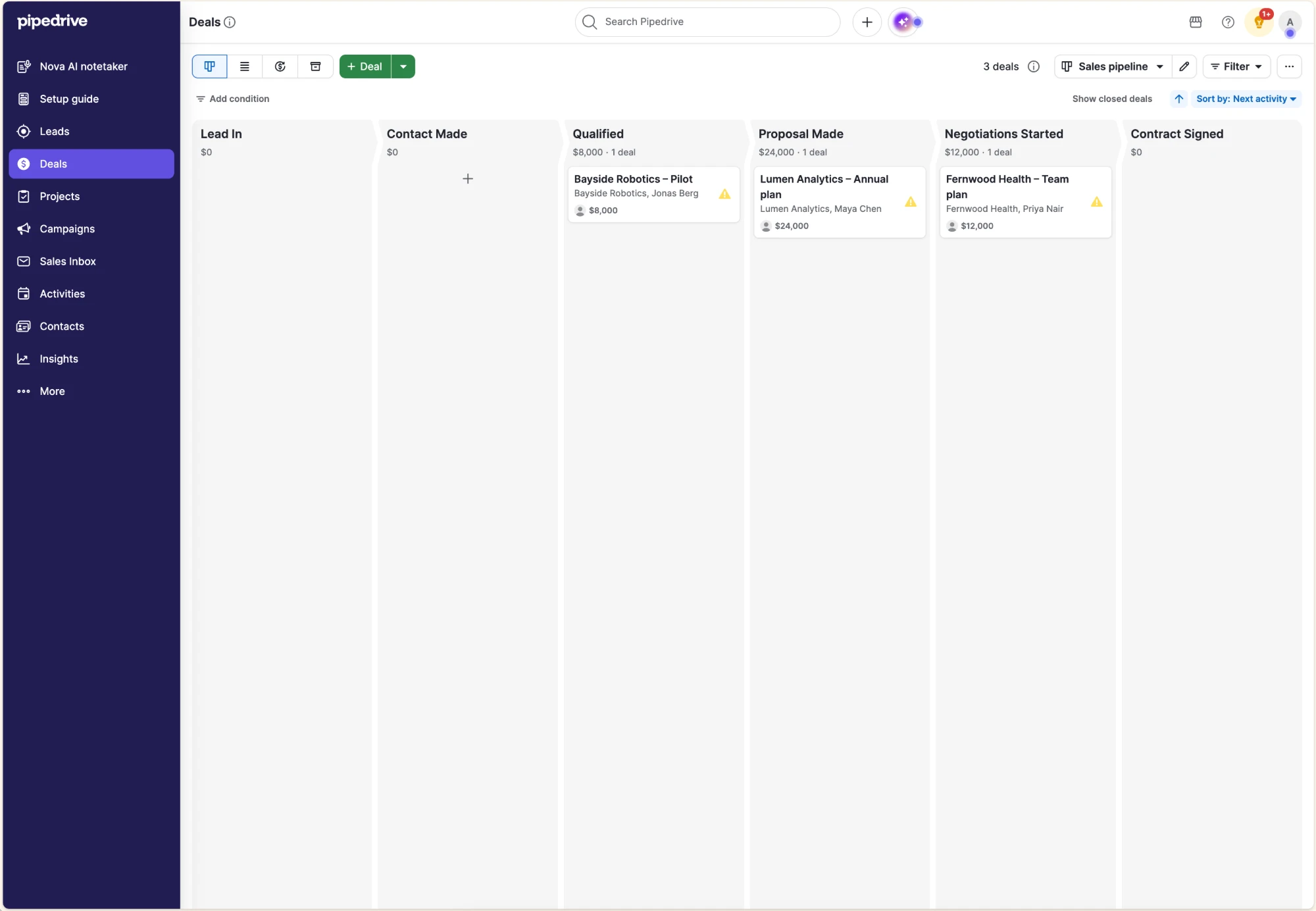
Best for: small teams that want the simplest visual pipeline and are happy to update it by hand.
Pipedrive is a visual sales pipeline: deals on a board, dragged between stages, with activities and reminders keeping reps moving. It was founded in Estonia in 2010 by salespeople who wanted a CRM built for the people doing the selling, and it has stayed close to that idea, with no admin hire and no long implementation. Reps are usually productive within hours. Pipedrive is at its best for small teams with a clear, repeatable sales process and the discipline to log their work. For startups that want to find new customers, keep records current without typing, or bring product data in, the pipeline needs add-ons and other tools around it. See Zero vs Pipedrive.
Key features
- Visual pipeline: the category benchmark for dragging deals between stages, so everyone sees where each deal stands at a glance.
- Activities and reminders: scheduled calls, emails and tasks that keep follow-ups from slipping.
- AI sales assistant: flags stalling deals and suggests next actions, based on what the team has logged.
- Automation builder: workflow automations from the middle tiers up, for moving deals and assigning tasks.
- Add-ons: Prospector for leads, Campaigns for email marketing and a web visitor tracker, each billed separately.
- App marketplace: several hundred integrations and a large partner network.
Pricing: four plans from $14 to $79 per seat per month on annual billing, or $24 to $99 monthly. There's no free plan, and there's a 14-day trial. Add-ons like Campaigns and web visitors bill separately. Checked October 2026.
Pros
- One of the easiest CRMs to learn: reps are productive within hours.
- Clear, predictable pricing with a low entry point.
- A long track record and a large marketplace.
Cons
- The record is only as current as what your team types in.
- No built-in sourcing; prospecting needs a credit-metered add-on or separate tools.
- Email sync and automations start above the entry plan.
What users say: users on G2 praise its ease of use and visual pipeline, but say add-ons and higher plans add up.
Verdict:Pipedrive is the better choice if you want the simplest pipeline your team will learn in an afternoon, and you're happy to keep it updated by hand. Once you need sourcing, outreach or a record that stays current on its own, compare Pipedrive plus its add-ons and the tools around it, not the entry seat price.
5. Salesforce
Best for: startups that already know they're heading into complex enterprise sales with large teams.
Salesforce is the world's most widely used CRM and the one enterprise buyers and experienced sales hires know best. It can model almost any sales process, with objects, workflows, permissions and forecasting built for large teams. For small companies, the Starter Suite packages pipeline tracking, basic case management and email campaigns into one workspace. It was built as a database long before AI, and its Agentforce features sit on top of a complex system, mostly on higher tiers. Salesforce is at its best when a startup is already selling into enterprises and needs a CRM its buyers and future hires recognise. It's often not a startup's first choice, though: for an early team without an admin, the setup is complex and it's a lot of system to keep running.
Key features
- Starter Suite: pipeline tracking, basic case management and email campaigns in one workspace, built for small teams.
- Deep customisation: objects, workflows and permissions for complex, multi-team sales processes.
- Forecasting and reporting: built for large teams, multiple pipelines and board-level reporting.
- Agentforce: AI agents for research, drafting and deal coaching, mostly on higher tiers or with extra licences.
- AppExchange: the largest marketplace of apps in the category.
- Partner network: implementation partners and admins available almost everywhere.
Pricing: Starter Suite is $25 per user per month. Sales Cloud ranges from $25 to $550 per user per month depending on the edition, and Agentforce often needs higher tiers or extra licences.
Pros
- Scales to almost any team size or sales process.
- Familiar to enterprise buyers and experienced sales hires.
- A clear upgrade path as you grow.
Cons
- A lot of system for a pre-seed to Series A team.
- Not built AI-native, and the useful AI sits on higher tiers.
- Setup and upkeep usually need a dedicated admin or partner.
What users say: users on G2 praise its power and reporting, but mention a steep learning curve and the need for an admin.
Verdict:Salesforce is the better choice if enterprise deals are already arriving and your buyers, investors or future hires expect it. Before that, budget for an admin or partner, and for the higher tiers where the useful AI and automation live.
6. Lightfield
Best for: meeting-heavy teams that want conversation intelligence first.
Lightfield is an AI-native CRM from the founders of Tome, and the product most similar to Zero on this list. It's built outward from conversations: meetings, calls and the inbox are the source of truth, and the record keeps itself up to date from them. Its native recorder, transcription and searchable conversation memory are excellent. Lightfield is at its best for teams whose selling lives in meetings and who want those conversations captured and searchable. For startups that also need to find new customers and run outbound, sourcing and sequences are newer, and the jump from the three-seat Starter plan to the $999-a-month Pro plan is steep for a growing team. See Zero vs Lightfield.
Key features
- Meeting capture: a native recorder, transcription and summaries, with no separate notetaker needed.
- Conversation memory: ask what a prospect said and get answers with citations back to the transcript.
- Automatic record keeping: accounts, contacts and deals updated from mail, calendar, Slack and LinkedIn.
- Agents and workflows: agents built from plain-language prompts.
- Sequences: in beta, with outbound setup included as a service on the Growth plan.
- Workspace plans: Pro and Growth are priced per workspace rather than per seat.
Pricing: Starter is $89 per seat per month, billed monthly, for up to three seats, with a 14-day trial. Pro is $999 a month and Growth $2,999 a month per workspace, both billed annually, and Enterprise is custom. Growth includes 10 capture seats and 750,000 records. Lightfield raised Growth from $1,999 in November 2026 and has changed its pricing several times this year, so check again before buying. Checked November 2026.
Pros
- Best-in-class native meeting capture and conversation memory.
- Viewer seats let the wider team read the customer record.
- A polished, self-updating product.
Cons
- A steep jump from the three-seat Starter plan to Pro at $999 a month, and pricing has changed several times this year.
- Sourcing and sequences are newer, and sequences are still in beta.
- Single sign-on is Enterprise only.
What users say: Lightfield is too new to have many G2 reviews yet.
Verdict:Lightfield is the better choice if your selling happens mostly in meetings and you want the best conversation capture available, with the whole company able to read the record. If outbound and sourcing matter as much as meetings, or you need a predictable monthly bill, compare it with an all-in-one per-seat plan.
7. Monaco
Best for: founders at seed and Series A who've never run sales and mainly need first meetings booked, with an experienced operator guiding the work.
Monaco is an AI-native sales platform from Sam Blond, former CRO at Brex and partner at Founders Fund, launched in February 2026. It builds your target market, scores accounts, runs outbound campaigns with agents, records meetings, and assigns an experienced sales exec from its own team to guide the work. There's a CRM underneath, but the centre of gravity is prospecting and outbound. Monaco is at its best when a founder with no sales background needs a first pipeline fast and would rather buy a service with software attached. For teams where several people work the same accounts, or that need the whole customer lifecycle in one system, the CRM layer is thinner. See Zero vs Monaco.
Key features
- Target market and account scoring: builds your total addressable market and ranks the accounts to go after first.
- AI outbound: agents run outbound campaigns, so sequences are live within days of onboarding.
- Bundled prospect data: a proprietary database included, with no separate data contract.
- Meeting recording: calls captured and summarised on the record.
- Embedded sales exec: an experienced seller from Monaco's own team sets up and monitors the work.
- Pipeline management: a CRM layer to track deals from those first meetings.
Pricing: Monaco doesn't publish pricing. It charges a flat annual fee quoted through a sales conversation, and startups evaluating it report quotes of around $25,000 a year with an annual commitment. Checked September 2026.
Pros
- Very fast to a first pipeline, with target market and sequences running within days.
- Prospect data bundled in, so there's one less tool to buy.
- Experienced humans guide the agents, which early customers praise most.
Cons
- Pricing isn't published, and the reported annual commitment is a big step for an early startup.
- The CRM layer is thinner for teams and for everything after the deal closes.
- Monaco's staff operate part of your go-to-market, so the setup lives partly with the vendor.
- Launched in 2026, so there's little track record yet.
What users say: Monaco is too new to have enough G2 reviews to score. Early beta customers mostly praise the speed to first meetings and the embedded sales exec.
Verdict:Monaco is the better choice if you’re buying a service more than software: experienced sellers who set up and run your outbound, with the tech underneath. It suits a founder who has never run sales, mainly needs first meetings booked, and has room in the budget for the annual fee. If you’d rather own your go-to-market and run the software yourself, or you’re building a sales team that needs to work in one system, a CRM your team operates is the better fit.
8. Close
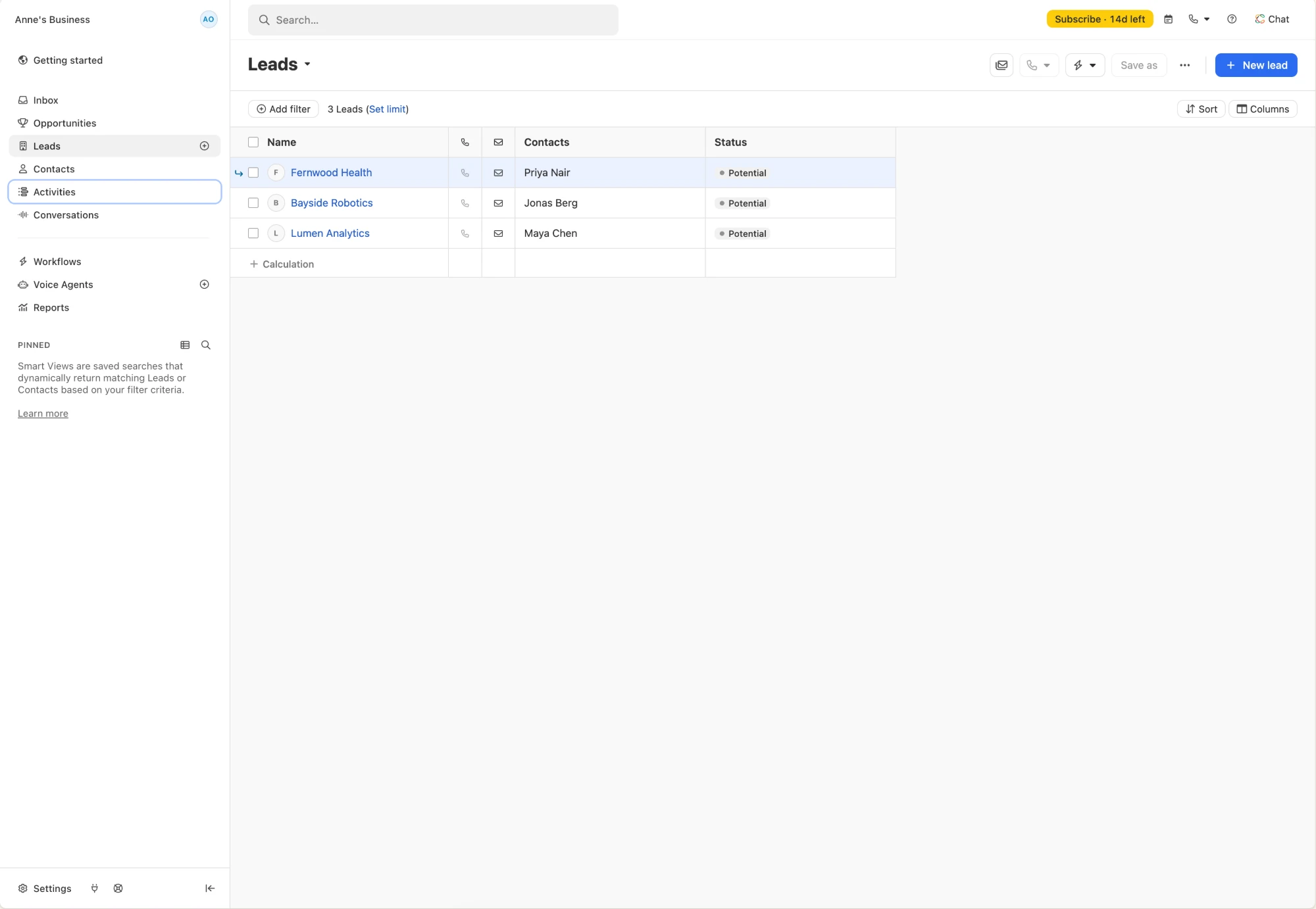
Best for: outbound teams whose selling runs on calls, email and SMS.
Close is a communication-first sales CRM. Calling, email, SMS and pipelines live in one workspace, so reps don't switch between a CRM and a separate sales engagement tool, and every call and email is logged on the lead as it happens. It was built by a team that ran an inside sales agency, and it's popular with high-volume outbound and inside sales teams. Close is at its best when your reps spend their day on the phone and in the inbox, working through lists of leads. For startups that also need to find those leads, enrich them or bring in product data, a database and enrichment come from other tools, and calling and SMS add usage costs on top of the seat price.
Key features
- Built-in calling: call from the CRM, with power and predictive dialing on higher plans.
- Email and SMS sequences: automated multi-step follow-up from inside the CRM.
- Automatic activity logging: calls, emails and SMS logged on the lead without manual entry.
- Multiple pipelines: lead and opportunity management across different sales processes.
- AI features: call summaries, email drafting and sales assistance.
- Integrations: connections to common tools like Zapier, Slack and Segment.
Pricing: from $9 per user per month for Solo to $139 for Scale on annual billing, with Essentials at $35 and Growth at $99. Monthly billing runs from $19 to $149. Calls and SMS are billed by usage. Checked October 2026.
Pros
- Calling, email and SMS in one place, with no extra sales engagement tool.
- Strong for high-volume outbound.
- Easy for reps to pick up.
Cons
- Calling and SMS costs grow with usage.
- No built-in company database or enrichment for finding new accounts.
- Less flexible for customisation and reporting.
What users say: users on G2 praise its ease of use and all-in-one calling and email, but mention call issues and a limited mobile app.
Verdict:Close is the better choice if your team lives on the phone and in the inbox, working leads you already have. If you also need to find and enrich those leads, add a database and enrichment tool to the comparison, along with the usage costs for calls and SMS.
9. Zoho CRM
Best for: cost-conscious startups that want the most features for the price, and have time to configure them.
Zoho CRM is part of Zoho's suite of more than 50 business apps, and it offers one of the broadest feature sets on this list for the price. It covers leads, deals, workflow automation, forecasting, reporting and a unified inbox across email, phone, chat and social, and its Canvas studio lets you redesign the interface itself. The free plan supports up to three users. Zoho is at its best for cost-conscious teams that want a lot of functionality and have time to configure it, especially if they already use other Zoho apps. For teams without that time, the learning curve is steep, and records stay current only as long as people keep updating them.
Key features
- Workflow automation: rule-based automations for assigning leads, updating records and sending follow-ups.
- Unified inbox: email, phone, chat and social messages in one place.
- Canvas: drag-and-drop design for your own CRM views and layouts.
- Forecasting and analytics: pipeline forecasts and customisable reports.
- Zia AI: Zoho's assistant for predictions, suggestions and data entry help.
- Zoho ecosystem: native links to Zoho's other business apps, from books to support desk.
Pricing: free for up to three users. Paid plans run from $14 to $52 per user per month on annual billing, or $20 to $65 monthly. Checked September 2026.
Pros
- A very broad feature set for the price.
- Deep customisation.
- A natural fit if you already use Zoho apps.
Cons
- A steep learning curve, and the interface can feel cluttered.
- Advanced configuration takes time.
- Data stays current only if your team updates it.
What users say: users on G2 praise its features for the price, but mention complexity, slow loading and support.
Verdict:Zoho CRM is the better choice if you want the most features for the lowest seat price and have time to configure them, or if you already run on Zoho. If speed to a working pipeline matters more than breadth, a simpler or more automated tool will get you selling sooner.
10. Freshsales
Best for: small sales teams that want CRM and built-in phone and chat at a low price.
Freshsales is the sales CRM from Freshworks, the company behind Freshdesk. It combines pipelines, contact scoring and built-in phone, email and chat, with sequences included on every paid plan and Freddy AI for deal insights. Paid plans start low, and there's a 21-day free trial. Freshsales is at its best for small sales teams that want CRM and communication tools in one place without paying for a separate dialer or sequencer. For teams that need to find new customers, or want deeper reporting and customisation as they grow, a database and more advanced tooling come from elsewhere.
Key features
- Built-in communication: phone, email and chat inside the CRM, with no separate dialer needed.
- Sequences: multi-step email follow-up included on every paid plan.
- Freddy AI: contact scoring, deal predictions and next-step suggestions.
- Workflows: automations for repetitive tasks like assignments and updates.
- Visual pipeline: Kanban views of deals across stages.
- Freshworks suite: connects to Freshdesk and other Freshworks tools for support and marketing.
Pricing: paid plans run from $9 to $59 per user per month on annual billing, or $11 to $71 monthly. Freshworks dropped the free plan in mid-2026, and there's a 21-day trial. Checked July 2026.
Pros
- A low starting price.
- Communication tools built in.
- Quick to set up.
Cons
- Advanced reporting and customisation are limited.
- Complex workflows have a learning curve.
- No built-in database for finding new accounts.
What users say: users on G2 praise its ease of use and support, but mention limited reporting and automation.
Verdict:Freshsales is the better choice for a small team on a tight budget that wants calling and sequences in the CRM from day one. If you also need to source new leads or want deeper reporting as you grow, include a database and reporting tools in the comparison.
11. Folk
Best for: relationship-driven teams, like agencies, partnerships and investors, managing a network they already have.
Folk is a lightweight, contacts-first CRM. Its standout is contact capture: email, calendar, LinkedIn and WhatsApp all feed one shared contact base, and you can have a usable CRM within an hour. It's popular with agencies, partnership teams, investors and founders who sell mostly through their network. Folk is at its best for managing relationships you already have and keeping a team's address book in one place. For startups building new pipeline, there's no lead database or sourcing, and deals, sequences and dashboards only come with the Premium plan. See Zero vs Folk.
Key features
- Contact capture: sync from Gmail, calendar, LinkedIn and WhatsApp into one shared base.
- Lists and views: organise people and companies by group, stage or custom field.
- Email campaigns: personalised bulk campaigns, with sequences on Premium.
- Magic Fields: AI that fills in and summarises contact data, on a monthly credit pool.
- Deals and pipelines: simple deal tracking on the Premium plan.
- Integrations: connections to common tools through Zapier and a public API on Premium.
Pricing: Folk ranges from $24 to $80 per seat per month when billed annually. Deals, sequences and dashboards are on Premium at $48. There's no free plan, and there's a 14-day trial. Checked September 2026.
Pros
- Excellent contact capture from LinkedIn, Gmail and WhatsApp.
- A usable contact base within an hour.
- A fair price for teams that mainly need a shared address book.
Cons
- No lead sourcing or built-in database.
- Deals, sequences and dashboards are all on Premium.
- Reporting is thin.
What users say: users on G2 praise its simplicity and fast setup, but mention no mobile app and limited reporting.
Verdict:Folk is the better choice if your sales run on relationships you already have and you mainly need a shared, well-organised address book. If you're building new pipeline through outbound or inbound, you'll need sourcing and sequences from somewhere else, or a CRM that includes them.
Honourable mentions
- Capsule: a simple, low-admin CRM with a free plan for two users.
- monday sales CRM: good for teams that already run projects in monday.com and want deals on the same boards.
- Twenty: an open-source CRM for technical teams that want to self-host and build their own integrations.
How to choose for your stage
The right CRM depends less on features than on who will keep it running.
Pre-seed: the founder sells. You need to know who to talk to today and have every conversation on record, without a setup project. A spreadsheet works until a second person needs the same data. Pick a tool that updates itself, so the CRM doesn't become another job: Zero if you're also finding new customers and want agents to handle the admin, HubSpot's free plan if you mainly need to manage deals.
Seed: the first sales hire joins. The question becomes whether one system can find, reach and close customers, or whether you'll stitch together a CRM, a data tool and a sequencer. Count the full stack cost. Pipedrive and Freshsales are simple and cheap on their own; Zero and Close bring outreach into the same product.
Series A and B: a real go-to-market team. Reporting, forecasting and data quality become board questions. Attio fits if you have a RevOps person to design the system, and HubSpot if marketing drives most of your growth. At Series A, Zero fits teams that want the record to stay current as they add sellers, without adding admin, and that want the full customer context in one place, with product usage and support tickets next to every deal.
Choose the CRM your team will actually keep current
Every CRM on this list can store contacts and deals. The difference is how much work it takes to keep that data true as your startup grows. Zero is built so nobody has to update the CRM by hand, with sourcing and outreach on the same record.
Try Zero free for 14 days, or see how Context.dev runs its funnel on Zero. For more on where startups come from when they switch, read what CRM startups actually use, and see every customer story.
Frequently asked questions
What is the best CRM for startups?
Does a startup need a CRM?
Is there a good free CRM for startups?
How much should a startup spend on a CRM?
How long does it take to set up a CRM?
Which CRM should a startup switch to from HubSpot?
What's an AI-native CRM?
Prices and features checked against each vendor's website between July and November 2026, and dated in each tool's pricing section. Vendors change plans often, so check before you buy.
Written by
Taru Heikinniemi, Head of Growth at Zero
Taru Heikinniemi has spent her career working as a CRM consultant and leading growth at early-stage companies, and she has advised startups and scaleups on go-to-market, tech stacks and martech. She's set up, run and rescued more CRMs than she'd like to admit, and now helps startups pick the one their team will actually keep current.