



Command menu 2.0
The rebuilt Zero command menu makes search faster and shows deal values, stages, and related interactions before you open a record.
The ⌘K command menu, rebuilt
What’s new
We’ve completely overhauled the ⌘K command menu to make it feel instant and more capable.
Updates include:
- A faster and sleeker interface with snappier performance
- A dedicated button in the sidebar to open ⌘K at any time
- More than navigation. ⌘K now gives you a quick overview of records, not just a way to jump between sections
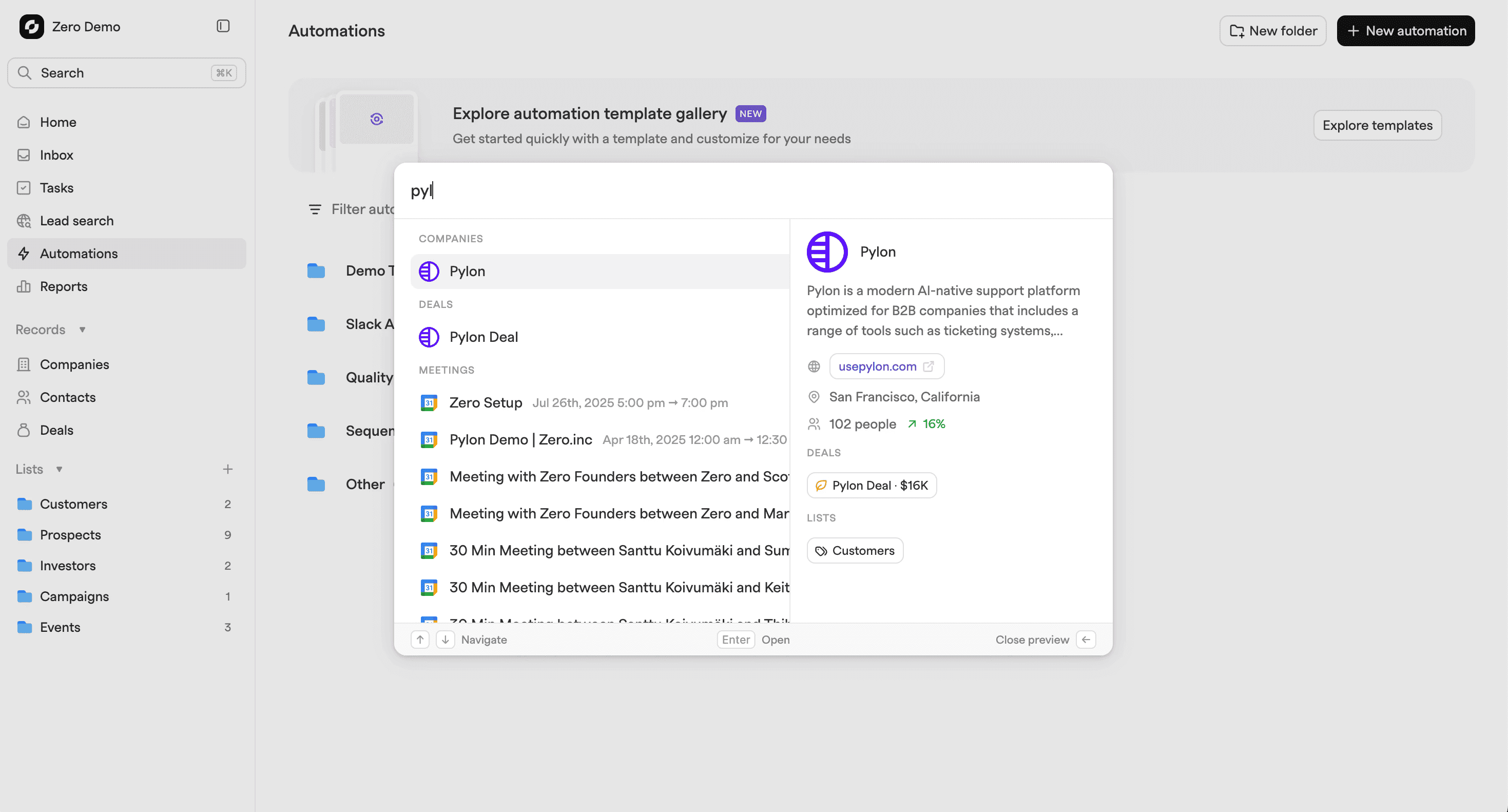
When searching for a deal, company, or contact, you can now instantly see:
- Linked deal values
- Current stage
- Related interactions
Why this matters
⌘K is meant to help you move quickly, not interrupt your flow. With these improvements, it becomes a lightweight control center instead of a simple search box.
You can scan important details, understand context, and decide where to go next in seconds. That means fewer clicks, less tab hopping, and faster decisions throughout your day.
The result is a command menu that actually feels like a power tool, built for speed and clarity.